What Is Adaptive Learning and How Does It Actually Work

Adaptive learning is a method that adjusts lessons, pace, and feedback to each learner's performance in real time. In practice, an Irish beginner who misses a phrase gets extra support, while someone who already knows it moves on instead of repeating the same exercise.

You may recognize the frustration behind that difference. You open a one-size-fits-all language lesson, understand the greetings, then spend several minutes reviewing them because the book follows its own schedule. A few pages later, the grammar suddenly becomes difficult, but the lesson keeps moving whether you're ready or not.

Adaptive learning changes that fixed route. It uses your answers, errors, response patterns, and progress to decide what you should practise next. The approach has grown from a small research topic into a major field. One bibliometric study recorded 1 publication in 1990 and 636 in 2023, while a separate Web of Science analysis identified 3,518 indexed publications from 1990 to 2024, including 2,501 articles and 762 conference proceedings. The published analysis of adaptive learning research shows how the idea moved from early experimentation into mainstream academic and applied interest.

Table of Contents

What Adaptive Learning Means in Plain English

Suppose you're learning Irish and the textbook gives every beginner the same sequence. You study greetings, family words, numbers, sentence structure, and pronunciation in that order. If you already know some family words, you still complete the entire unit. If the pronunciation section leaves you confused, the next page doesn't know that.

Adaptive learning is a method that continuously adjusts lesson difficulty, sequencing, pacing, and feedback based on your current performance and patterns. The system doesn't just ask what you want to study. It watches what you can do, notices where you hesitate or make repeated errors, and changes the next activity accordingly.

A personalized learning path is the individual route a learner follows through a larger set of lessons. Two people may study the same subject but receive different examples, practice items, revision intervals, or explanations. Personalization is the broad goal. Adaptive learning is a more specific, data-driven form of personalization because the platform changes the route using evidence from your learning activity.

That distinction matters. A tutor who remembers your name and asks about your interests is offering personal attention, but the lesson isn't necessarily adaptive. An adaptive system must use learner information to make instructional decisions, such as returning to a missed word, changing the difficulty of a grammar task, or slowing the pace of a pronunciation activity.

Practical rule: If a platform only lets you choose a topic, it may be personalized. If it changes what happens next because of your demonstrated performance, it's adaptive.

The rest of the subject becomes easier when you separate the questions:

  • How does the system work? It combines a learner model, a content structure, and decision logic.
  • What changes? Content selection, pacing, feedback, and sequencing can all respond to your performance.
  • What does it look like in language learning? Vocabulary quizzes, grammar drills, pronunciation practice, and conversation scenarios can branch in different directions.
  • What are the limits? Adaptive tools can reduce unnecessary repetition, but they can't measure every part of real communication.
  • How should you choose one? Look for transparent adaptation, useful progress information, and a clear path from practice to real-world use.

Readers who want to explore the wider idea of digital personalization can also browse the SupportGPT personalization guides, especially when comparing simple customization with systems that respond to user behaviour.

How Adaptive Learning Systems Actually Work

A useful way to understand an adaptive system is to meet its three characters.

The first is a tutor who keeps notes. After each exercise, the tutor records what you know, what you confuse, how quickly you answer, and which kinds of help you need. In technical language, this is the learner model, a changing profile of your current knowledge, weaknesses, and learning behaviour.

The second is a library of lessons. It contains the Irish greetings, vocabulary items, pronunciation clips, grammar explanations, conversation prompts, and review exercises that the system can offer. This is the domain model, the organized map of the subject. It shows which skills belong together and which ideas usually need to come first.

The third is the tutor's decision-making brain. It examines the notes, looks at the available lessons, and chooses the next useful activity. This is the adaptation engine. Its job is to translate evidence about your performance into an instructional decision.

A diagram illustrating how adaptive learning systems work by comparing a human tutor to AI technology.

An algorithm is the set of rules or learned patterns used to make that decision. A simple algorithm might follow an if-then rule: if you miss a vocabulary item, show it again with a hint. A more data-driven system may look for patterns across many interactions and estimate which activity is most likely to help next.

The process repeats in a loop:

  1. You answer or interact. You translate a phrase, choose a word, repeat audio, or respond to a prompt.
  2. The learner model updates. The system records accuracy, errors, response time, or other permitted signals.
  3. The adaptation engine chooses. It selects an item, explanation, difficulty level, or review interval.
  4. You practise again. Your next response gives the system new information.

That loop is why adaptive learning feels different from a fixed worksheet. The system doesn't wait until the end of a unit to discover that you're struggling. It can react during the lesson.

The architecture is common in language education. A guide to machine learning in education can help you see how these models fit into the wider technology field, while discussion of scalable AI customer support offers a useful comparison for understanding how software can respond to changing user needs.

In an Irish app, the loop might lead to a short drill on a phrase you repeatedly confuse, followed by an easier example and then a conversational prompt using the same structure.

The Core Mechanics That Make Lessons Adapt

The phrase “the lesson adapts” can sound vague until you separate the changes into four mechanics. These are the practical levers a platform can adjust.

Content selection

Content selection means choosing which learning item appears next. If you miss an Irish word for “house,” the system might offer that word again, place it in a simpler sentence, or show an image before asking you to recall it. If you answer several related items comfortably, it may introduce a new word instead of filling your screen with familiar material.

The important question is not whether the platform has many lessons. It's whether it chooses from those lessons using a meaningful picture of your needs.

Pacing

Pacing is the amount of time or practice you receive before moving forward. A learner who recognizes a phrase quickly may need only a short check. Someone who pauses, guesses, and then repeats the same mistake may benefit from another explanation or a slower activity.

Pacing doesn't always mean making everything slower. It can also remove material you've already demonstrated. That's how an adaptive course can feel less tiring without becoming less demanding.

Feedback

Feedback tells you what happened and what to try next. A weak message says “wrong.” Useful feedback might identify the word you confused, replay a pronunciation model, show a translation, or give you a hint before another attempt.

In language learning, timing matters. Feedback that arrives immediately can connect the correction to the mistake while you still remember what you were thinking.

Sequencing and difficulty scaling

Sequencing is the order in which skills appear and return. Difficulty scaling changes the challenge within that order. A platform might revisit greetings before introducing a longer exchange, then increase the difficulty by removing a translation or requiring a spoken response.

These mechanics can use different kinds of decision-making:

  • Rule-based adaptation uses visible if-then logic, such as returning an item after an incorrect answer.
  • Data-driven adaptation uses statistical or AI-based patterns drawn from prior learning activity.
  • Hybrid adaptation combines instructional rules with performance signals, so the system has both clear boundaries and room to respond.

An infographic detailing four core mechanics of adaptive learning: content selection, pacing, feedback, and difficulty scaling.

A language app might respond to missed vocabulary by serving easier greetings, or insert pronunciation practice when your audio accuracy drops. The quality of that response depends on whether the system understands the skill being tested. A vocabulary mistake shouldn't automatically trigger a difficult grammar lesson.

Adaptive Learning in Language Apps and How Gaeilgeoir AI Fits

The clearest way to see adaptive learning is to follow one beginner through a lesson. You're practising Irish vocabulary, and the app tests whether you recognize a word in a short sentence. You answer correctly several times, so the item appears less often. Another word keeps causing confusion, so the app brings it back sooner and may place it in a more supportive context.

That approach differs from a standard flashcard deck. A non-adaptive deck may show cards according to a fixed order or a general schedule. An adaptive quiz uses your history to decide which items deserve more attention. Known words don't disappear forever, but they need less immediate practice than words you repeatedly forget.

The same principle can apply to grammar. A beginner may handle a simple sentence pattern but struggle when the subject changes or when a sentence appears without an English cue. Difficulty scaling can introduce those changes gradually rather than presenting the hardest form at once.

Conversation practice adds another layer. You might receive a prompt to greet someone, order food, ask for directions, or respond in a social situation. Your earlier choice can influence the next prompt, creating a branch that reflects the conversation rather than forcing every learner through identical lines.

Screenshot from https://gaeilgeoir.ai/dashboard/adaptive-quiz

Gaeilgeoir AI illustrates this kind of language-learning approach through adaptive quizzes, instant feedback, pronunciation support, and scenario-based practice. Its Irish learning environment is designed for beginners through intermediate learners, with everyday situations such as social interactions, work, travel, ordering food, and asking for directions. Learners can also explore AI language tutors as part of a broader practice routine.

The value lies in the combination. A quiz can identify a vocabulary gap, a pronunciation activity can address a sound, and a scenario can test whether you can use the material in context. Adaptation happens inside the tool, though it doesn't replace listening to real speakers, speaking with people, or handling the unpredictability of an actual conversation.

Real Benefits and Honest Trade-Offs for Learners

Adaptive learning can make daily practice feel more relevant because it directs attention toward what you haven't mastered. A systematic review of personalized adaptive learning in higher education included 69 eligible studies and reported medium-positive effects across cognitive, affective, and behavioral outcomes. The review in PubMed Central connects the strongest value to individualized content selection and continuous adjustment, not to static personalization alone.

That evidence supports several practical benefits, but each one has a boundary.

You spend more time on weak areas

A system can return to a difficult word, grammar pattern, or pronunciation task instead of asking you to repeat an entire unit. This may make practice more efficient and can help you notice a clearer relationship between a mistake and the next exercise.

The trade-off is that efficiency can become narrowness. If the system measures quiz accuracy well but measures spontaneous speech poorly, you may improve inside the exercises without becoming equally comfortable in an unpredictable conversation.

Familiar material creates less friction

Learners often lose patience when a fixed course makes them repeat material they already know. Adaptive content can reduce that boredom by moving through familiar items more lightly while preserving opportunities for review.

However, skipping too quickly can create false confidence. Recognition is not the same as recall, and recalling a word in a quiz is not the same as using it while listening to a fast speaker.

The useful question isn't “Did I get this item right?” It's “Can I still use this skill when the prompt changes?”

Feedback closes the loop

Immediate explanations and targeted corrections help you connect an answer to a learning decision. The system can also show patterns that are difficult to notice alone, such as repeated confusion between similar words.

A traditional tutor may still outperform an app when you need encouragement, cultural explanation, flexible questioning, or a response to something the software didn't anticipate. A fixed curriculum can also help an absolute beginner who needs a dependable structure before making many choices.

The evidence is not a guarantee that adaptation always wins. A large-scale study reported that adaptive paths reduced instructional time and content exposure, but effectiveness varied by module. Some topics improved, while others favoured regular instruction. The study of efficiency and effectiveness in adaptive learning paths reinforces a useful caution: adaptation works best when the content structure and the system's signals match the skill being taught.

How to Choose an Adaptive Learning Platform That Works for You

Before choosing an adaptive language platform, test what happens behind its friendly interface. A beginner learning Irish might miss maidin mhaith. A useful system should respond differently from one that treats every mistake the same way.

Does it adapt beyond shuffling questions?

Shallow adaptation changes card order. Deep adaptation changes the type of feedback based on error patterns. For example, repeated confusion between two Irish words might trigger a shorter example, a pronunciation prompt, a contrastive explanation, or a later review in a new sentence. If the app only presents the same explanation after every wrong answer, its personalization is limited.

A platform such as Gaeilgeoir AI's personalized learning paths should make its route understandable enough for you to see how practice changes.

What evidence does it use?

Look for a plain explanation of the signals involved. Does the platform consider accuracy, recurring error patterns, response time, pronunciation, confidence, or progress through related skills? It should also state what it does not measure. A pause might indicate confusion, distraction, or a noisy room, so the system should not treat every pause as proof that a learner lacks the skill.

Can you understand or influence the route?

Progress information should explain why an item has returned or why a lesson has become harder. Difficulty controls help if you already know some Irish and do not want to restart at the beginning. If recommendations appear without explanation, you cannot tell helpful personalization from random variation.

Does practice transfer beyond the screen?

Move from isolated vocabulary to phrases, listening, pronunciation, and scenario responses. If the platform tests recognition only, you will need another way to practise producing Irish. Questions about accessibility, cognitive load, and learner control can also be informed by Orange Neurosciences for learners.

A checklist infographic titled How to Choose an Adaptive Learning Platform with six key selection criteria.

Check the content library too. A system cannot choose a suitable next activity if it offers only a narrow range of exercises. Onboarding matters as well. A beginner-friendly Irish course should explain its assumptions, introduce the first tasks clearly, and avoid treating unfamiliarity as failure.

A two-week pilot lets you observe the platform using your real habits. Note whether repeated errors receive targeted practice, familiar skills stop dominating sessions, and new material remains usable outside the quiz.

Common Misconceptions About Adaptive Learning

Myth one, adaptive means effortless

Adaptive learning removes unnecessary repetition, not the need to practise. If you keep missing an Irish phrase, a responsive system may return to it in different forms, but you still have to retrieve it, listen carefully, and produce it.

Myth two, more data always means better learning

A learner model becomes useful when its signals are accurate and relevant. Tracking every pause or click won't automatically improve instruction. A smaller profile built around meaningful performance evidence can be more helpful than a noisy record that mistakes distraction for confusion.

Myth three, adaptive systems replace teachers

Adaptive technology can personalize practice, identify patterns, and offer immediate responses. It can't fully replace a teacher's ability to explain an unexpected question, respond to emotion, introduce culture, or reshape a lesson around a group.

Myth four, conjugation drills equal fluency

Grammar drills can strengthen a specific pattern. Fluency also requires listening, retrieval, pronunciation, vocabulary, interaction, and the ability to respond when nobody gives you four answer choices.

Myth five, scenario practice replaces real conversation

A scenario can prepare you for an interaction by giving you a safe place to rehearse. Real conversation includes unfamiliar accents, interruptions, imperfect audio, cultural context, and replies you didn't predict, so you need live or real-world practice as well.

Myth six, one platform fits every learner

An adaptive route is still constrained by the content, design, and measurements built into the platform. One learner may need pronunciation support, another may need reading practice, and another may need a teacher to explain why a form sounds natural in one context but not another.

Use this quick check when a product claims to be adaptive:

  • Specific signals: Does it explain what learner behaviour affects recommendations?
  • Visible changes: Can you see content, pace, feedback, or sequence changing?
  • Skill coverage: Does it measure more than multiple-choice accuracy?
  • Human support: Can a teacher or learner override a poor recommendation?
  • Real-world bridge: Does practice lead toward listening and speaking beyond the platform?

Adaptive learning is neither magic nor a synonym for personalization. It's a method for using evidence from your performance to make the next learning decision more relevant.


Gaeilgeoir AI offers adaptive quizzes, pronunciation support, instant feedback, and scenario-based Irish practice for everyday situations, so you can apply the ideas in this guide while building from beginner foundations. Visit Gaeilgeoir AI to explore a guided way to practise Irish at your own pace.

Machine Learning in Education: A Practical Guide for 2026

A lot of educators still talk about machine learning as if it's just around the corner. It isn't. In the 2024 to 2025 school year, 85% of teachers and 86% of students used AI, and 92% of higher-education students reported using generative AI in some form, up from 66% in 2024, according to these education AI adoption figures. That changes the conversation completely.

The question isn't whether machine learning belongs in education. It's how to understand it well enough to use it wisely. For teachers, that means knowing which tools support learning instead of adding noise. For families, it means seeing past the hype. For developers, it means building systems that help real students, not just dashboards.

Machine learning in education can sound technical, but in practice it often comes down to a simple idea. A system watches how a learner responds, notices patterns, and adjusts what happens next. In a classroom, that can look like a reading platform changing the next task, a writing tool giving personalized feedback, or a language app helping a student hear where their pronunciation drifted off target.

Table of Contents

The New Digital Classroom Is Already Here

AI is no longer waiting at the edge of school life. It is already part of the daily routine in many classrooms, study sessions, and homework habits.

That shift moves AI in schools from a pilot project to a daily reality. Teachers use it to draft examples, adapt practice, and give students faster feedback. Students use it for review, writing support, tutoring, and language practice. What changed was not just access to the tools. The bigger change was that both teachers and learners started treating them like ordinary school technology.
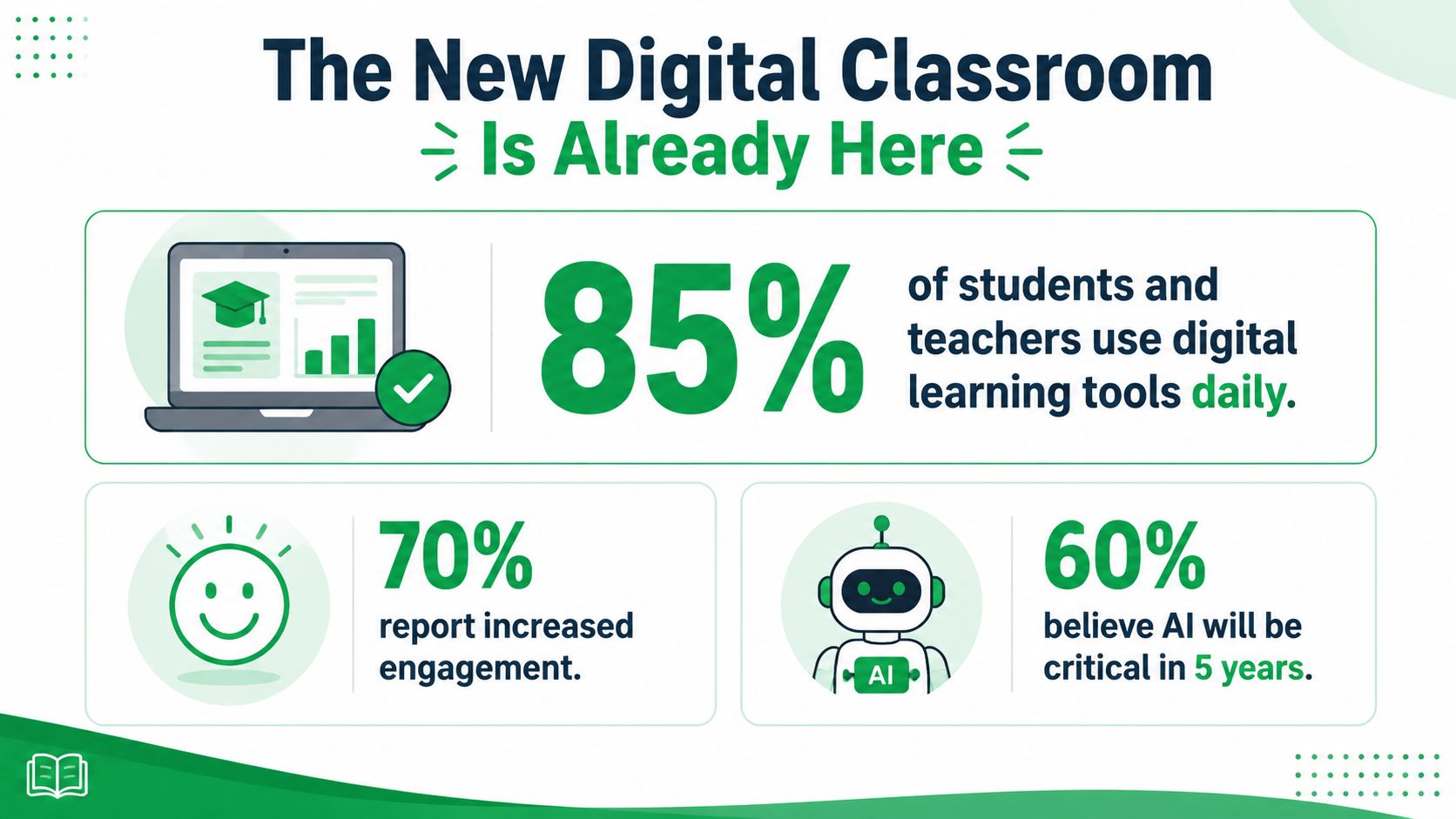
An infographic showing statistics about digital learning tools, student engagement, and the future role of AI in classrooms.

A useful comparison is the spellchecker. At first, it felt like an extra feature. Then it became a standard part of writing. Machine learning tools are following a similar path, except their role is broader. They can suggest the next activity, spot where a student is stuck, and respond differently based on patterns in performance.

That practical shift is especially visible in language learning. A student no longer has to wait for the next class meeting to practice pronunciation, get vocabulary review, or try a short conversation. Tools for AI-powered Irish language learning show how machine learning can bring guided practice into everyday study, even when a teacher cannot sit beside each learner one by one.

Machine learning now sits where calculators, search engines, and learning platforms once sat. At first it looked optional. Then it became part of the normal toolkit.

The classroom opportunity is real, but so is the need for judgment. Some tools save time and support learning. Others produce polished-looking mistakes, weak feedback, or unfair recommendations. Teachers do not need to become engineers to tell the difference, but they do need a clear mental model of what these systems are doing and where they can go wrong.

Understanding Machine Learning Without the Jargon

The simplest way to understand machine learning is to think of it as a digital tutor that gets better at responding. Not a human tutor. Not a magical mind. A system that notices patterns in student behavior and uses those patterns to make a decision about what should happen next.

That decision might be small. A different practice question. A hint instead of an answer. A review activity instead of a harder task. The key point is that the system doesn't just store information. It uses information to adjust its behavior.
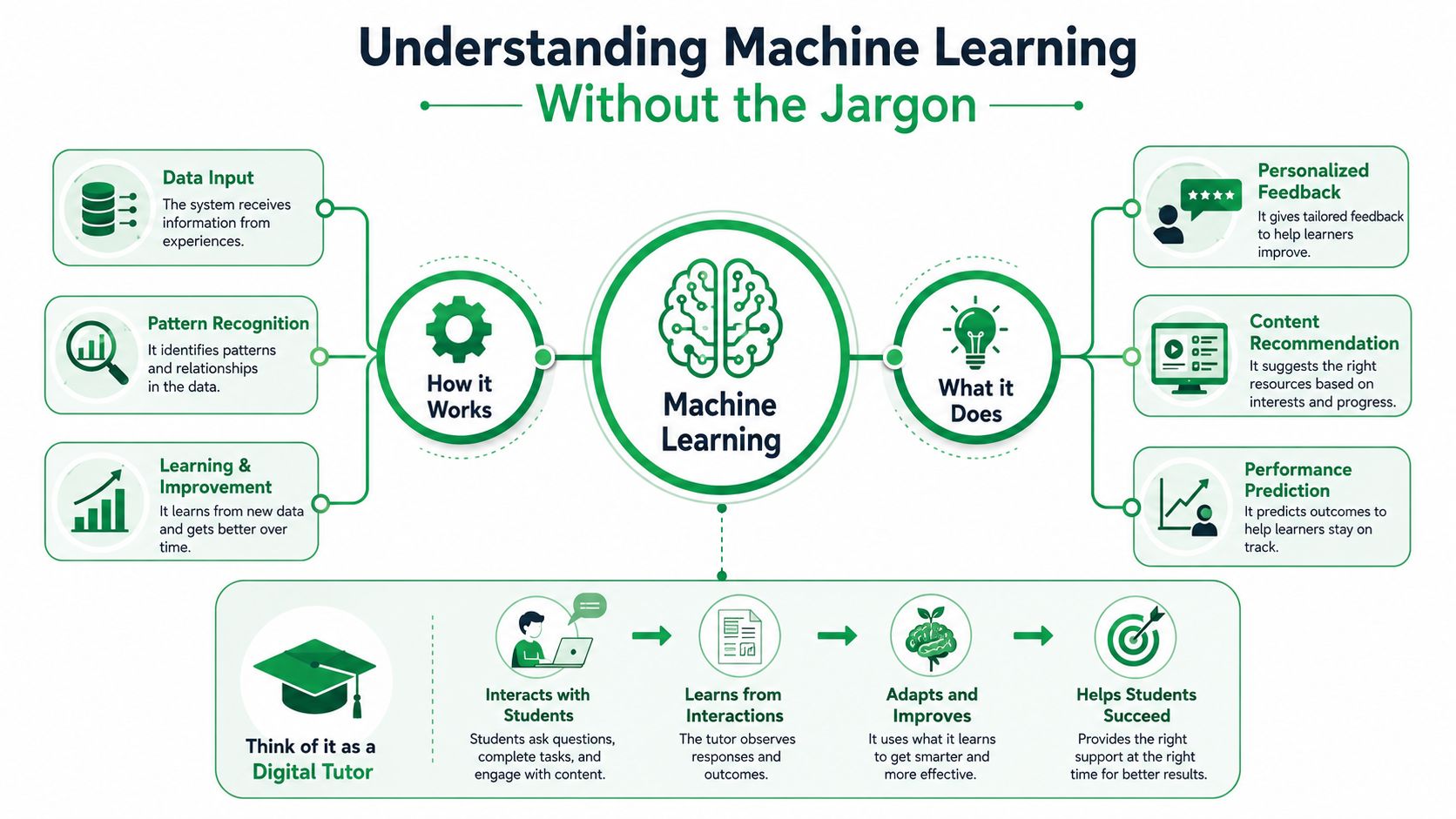
An infographic explaining how machine learning works in education using a digital tutor concept for students.

A plain-language way to think about it

A traditional worksheet treats every learner the same. Everyone gets the same sequence, the same timing, and the same next step.

A machine learning system tries to do something more responsive:

  • It observes: What did the student get right or wrong?
  • It compares: Does this pattern look familiar based on earlier learner behavior?
  • It decides: What task, prompt, or support is most useful next?

That's the heart of machine learning in education. It learns from data, then uses what it has learned to make a prediction or a choice.

For readers who want a quick visual explanation before going deeper, this short overview is helpful:

Where people often get confused

Many people mix up automation and machine learning. They're not the same thing.

A basic automated system follows fixed rules. If a student scores below a set mark, it shows review content. That can be useful, but it isn't especially flexible.

A machine learning system looks for patterns that aren't hand-written one by one. It may notice, for example, that a student answers correctly but slowly, or succeeds with vocabulary but stalls on sentence order. That richer pattern lets the tool respond more intelligently.

Practical rule: If a tool can explain what learner signals it watches and how those signals shape the next step, you're probably looking at a real machine-learning use rather than a simple scripted workflow.

That's why the phrase personalized learning can mean very different things. Some products personalize the surface. They change colors, names, or topic choices. Others personalize instruction itself. If you're curious how this shows up in language study, technology-supported Gaeilge learning is a good example of where adaptation can become concrete for the learner.

Three Core Techniques Driving Educational AI

Behind most educational AI tools, three techniques show up again and again. You don't need the math to understand them. You just need to know what job each one is doing.
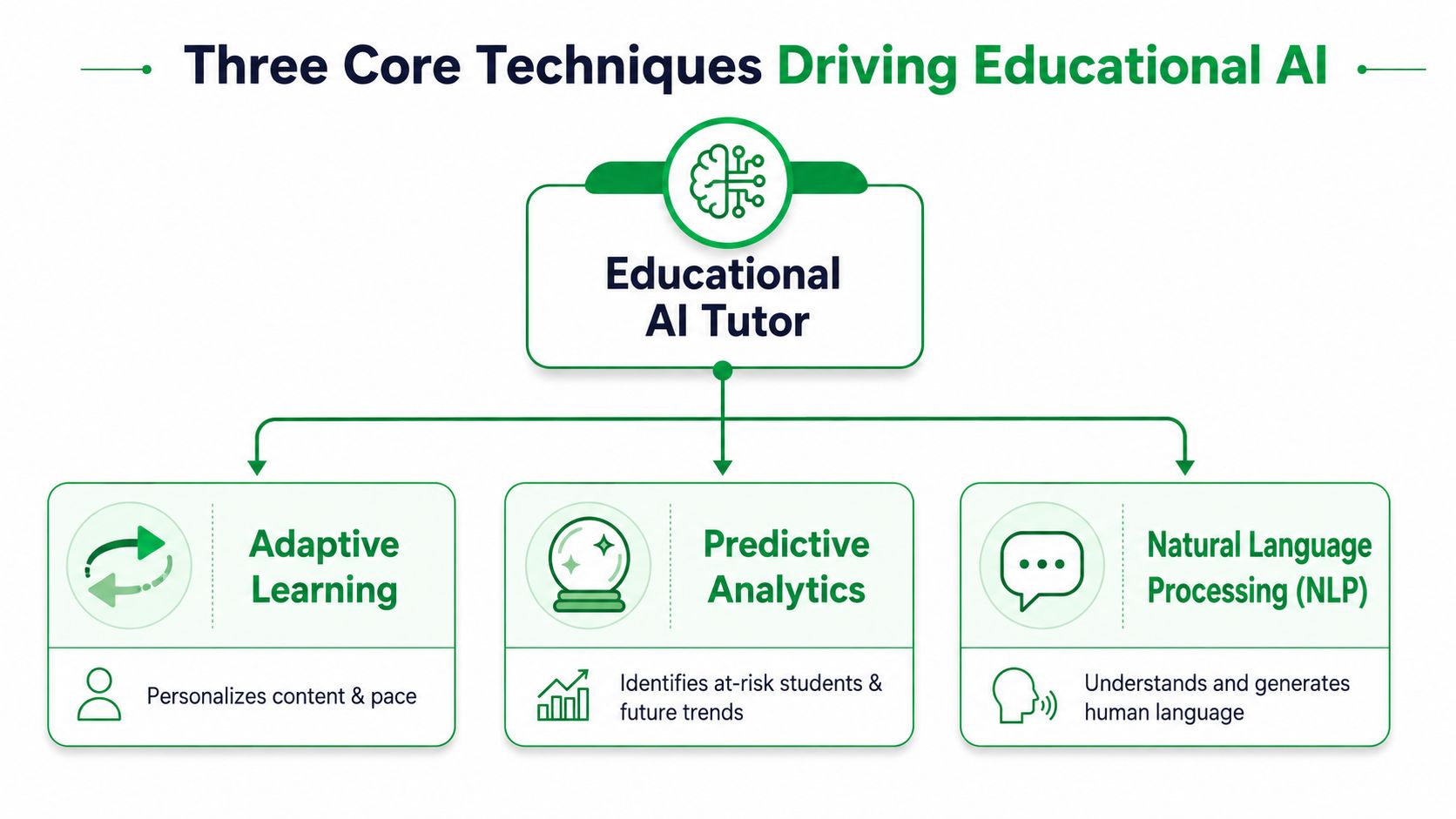
A diagram illustrating the three core techniques of educational AI: adaptive learning, predictive analytics, and natural language processing.

Adaptive systems that respond while a student is learning

This is the most classroom-friendly form of machine learning in education. The system watches learner signals such as accuracy, response time, engagement, and sequence history, then changes the next step in real time. The U.S. Department of Education describes this shift as moving from merely capturing data to detecting patterns in data and automating decisions about instruction, including adjusting sequence, pace, hints, or trajectory through a learning experience in its report on AI and teaching and learning.

In plain terms, the tool is acting less like a library shelf and more like a coach. It sees what just happened and chooses what should come next.

A useful example is math practice. If a student gets several fraction problems right but takes a long time on each one, the system might keep the topic the same while reducing time pressure and adding a worked example. If another student answers quickly and accurately, it can raise the difficulty so that learner isn't stuck doing repetitive work.

This same logic shows up in language tools too. A system may review a word just before a learner is likely to forget it, which is one reason spaced repetition in language learning fits naturally with machine learning.

Natural language processing for reading writing and speech

Natural language processing, often shortened to NLP, is what lets a machine work with human language. It helps tools analyze text, respond to writing, interpret speech, and generate feedback.

In education, NLP appears in writing assistants, reading support systems, chat-based tutors, and pronunciation tools. A student writes a paragraph. The system identifies unclear phrasing, missing structure, or repeated errors. A learner speaks into a microphone. The system compares the audio with expected pronunciation patterns and gives targeted feedback.

The confusing part is that NLP doesn't “understand” language like a teacher does. It recognizes patterns well enough to perform useful tasks. That distinction matters. It can be excellent for practice and feedback, but teachers still provide the deeper judgment about meaning, intent, and context.

Technique What it does Classroom example
Adaptive learning Changes task difficulty, pacing, or hints Reading app adjusts the next passage level
NLP Works with student language input Writing tool flags awkward sentence construction
Predictive analytics Estimates what may happen next Dashboard flags a student who may disengage

Predictive models that flag risk early

Predictive analytics uses past learner data to estimate future outcomes. In schools and colleges, that often means trying to identify which students may be at risk of disengaging before a teacher could confirm it by observation alone.

This can sound cold if it's framed badly. Used well, it's not about labeling students. It's about noticing patterns early enough to offer support while support can still help.

A prediction is only useful if a school treats it as a prompt for care, not as a verdict about a student.

The strongest implementations connect the prediction to action. A risk signal might trigger tutoring, advisor outreach, or a change in instructional support. Without that next step, prediction becomes little more than a report.

Real World Examples of Machine Learning in Education

The easiest way to judge machine learning in education is to look at what it does for actual learners. When the technology is useful, it usually solves a concrete classroom problem that would otherwise take a lot of human time.

General classroom uses

Start with a science class. A student is solving multi-step problems and keeps making the same kind of mistake in the middle of the process. An intelligent tutoring system can notice the pattern and offer guidance at the exact step where confusion appears, instead of waiting until the final answer is marked wrong.

In writing, machine learning can support draft review. A tool may detect recurring issues with structure, repetition, or clarity and give the student another chance to revise before a teacher reads the final version. That changes feedback from a one-time event into an ongoing loop.

Schools also use machine learning for early-risk prediction. Research on the ML life cycle in education describes a high-value use case where supervised models are trained on historical academic, attendance, behavioral, and engagement data to identify students likely to disengage or drop out before the outcome is directly observable. The same research stresses that prediction alone isn't enough. Institutions need to connect those signals to interventions and test whether those interventions change outcomes in practice, as discussed in this review of machine learning deployment in education.

That last point is significant. If a system flags a student but nobody follows up, the model hasn't helped. If a school uses the signal to trigger tutoring, outreach, or a change in support, then machine learning starts to matter in a human way.

For curriculum planning, some educators also explore tools that help organize materials and sequence content more efficiently. One example is PDF AI's curriculum agent, which shows how AI can assist with curriculum development tasks that usually involve a lot of manual document review.

Language learning as a high-impact example

Language learning is one of the clearest places to see machine learning at work because the feedback loop is so immediate. Learners need repeated practice, fast correction, and tasks that stay challenging without becoming discouraging.
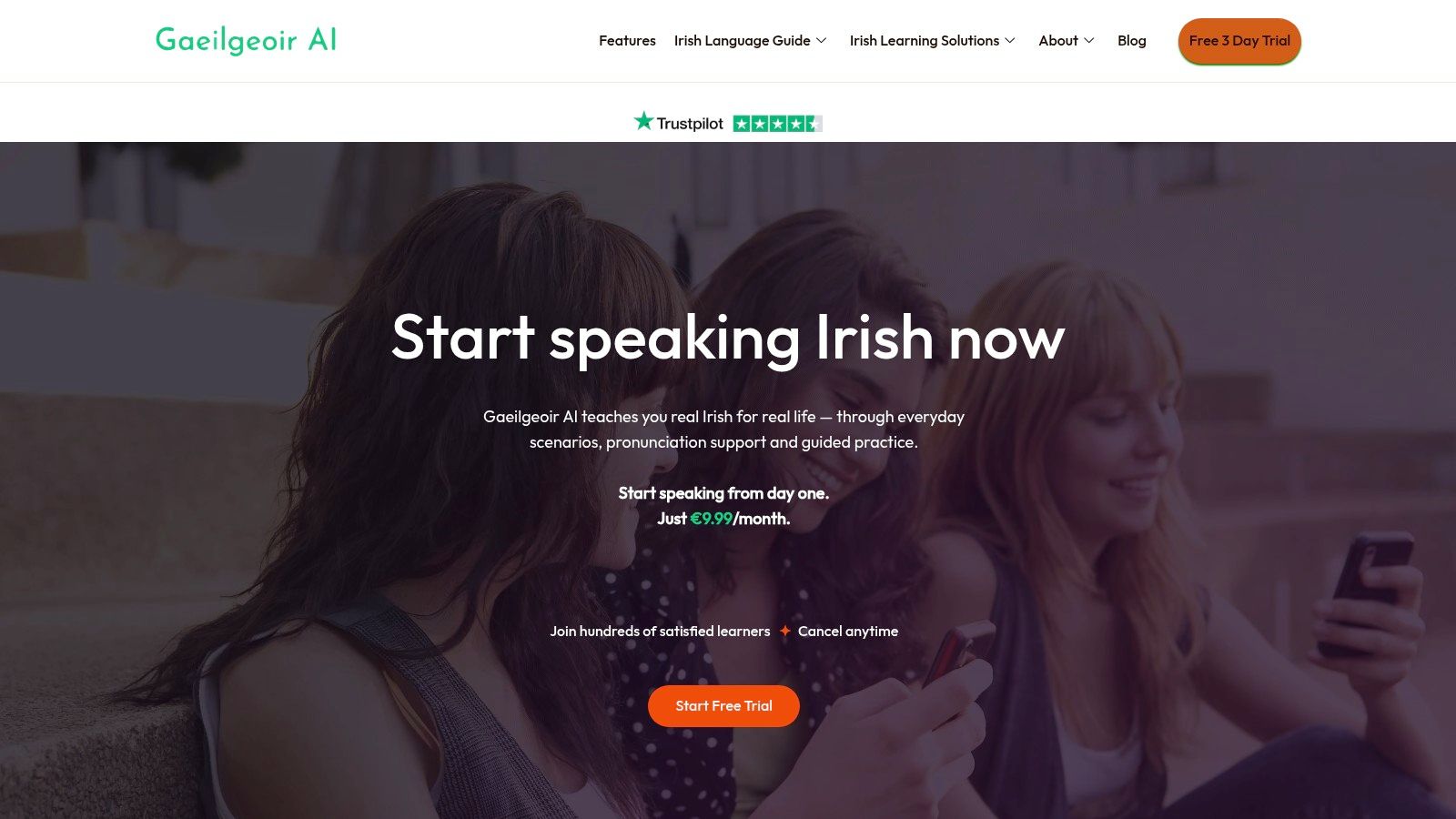
Screenshot from https://gaeilgeoir.ai

A strong language platform can listen for pronunciation patterns, track what vocabulary a learner knows, surface the right review item at the right time, and keep conversation practice within reach of the learner's current level. That's much harder to do well with static lessons.

One example in this space is Gaeilgeoir AI, which supports Irish learners with conversational practice, pronunciation feedback, and adaptive quizzes. That kind of setup matters because language learners often need many short cycles of attempt, correction, and retry. Machine learning can make those cycles immediate.

Good language software doesn't just ask, “Did the learner finish the lesson?” It asks, “What happened during the attempt, and what practice will help most now?”

In practical scenarios, the technology feels less abstract. A student mispronounces a phrase, hesitates on a common verb, or forgets a recently learned word. The system notices that pattern and changes the next prompt. That's machine learning translated into a teaching move.

How to Implement Machine Learning Tools

Adopting machine learning tools well has less to do with novelty and more to do with fit. The smartest question isn't “What can this AI platform do?” It's “What learning problem does it solve, and under what conditions?”

What teachers and school leaders should ask first

When schools evaluate a new product, flashy demos can distract from the basic educational test. A useful tool should make learning clearer, feedback faster, or support easier to target.

A simple review checklist helps:

  • Learning fit: Does the tool support a real instructional goal, such as reading fluency, writing revision, or language practice?
  • Teacher control: Can staff override suggestions, adjust tasks, and see what the system is doing?
  • Student visibility: Will learners understand why they are seeing a certain prompt, hint, or pathway?
  • Data boundaries: Is it clear what learner data is collected and how it is used?
  • Support for rollout: Will teachers get enough training time to use the tool well?

A pilot should also be small enough to observe closely. Watch how students respond. Notice whether teachers change their workflow. Look for friction points. Sometimes a tool looks impressive but asks too much of class time, attention, or setup.

For school teams wanting a practical institutional example, DocsBot's impact on education offers a concrete look at how an AI system can be embedded into an education setting.

What developers should build for

Developers often begin with model capability. Educators begin with learner need. The best products meet in the middle.

A responsible build process usually includes these design habits:

  1. Start with one learning problem. “Help students revise clearer essays” is a better starting point than “add AI to writing.”
  2. Work with teachers early. They'll show where students get stuck and what kind of feedback is usable in real time.
  3. Design for varied learners. A system should work for students who move quickly, students who need repetition, and students who use different devices or supports.
  4. Show the reasoning. If the product changes difficulty or flags a risk, users should be able to understand why.
  5. Test the intervention, not just the model. A prediction may be technically accurate and still educationally weak if it doesn't lead to better action.

That last point separates educational software from a pure analytics product. In schools, success isn't just whether the system noticed a pattern. Success is whether the response helped a student learn.

Addressing the Ethical Challenges of AI in Education

The biggest mistake schools can make with machine learning is treating it as neutral by default. It isn't. These systems reflect the data, assumptions, and design choices behind them.

Where bias enters the system

A recent review on inclusive AI in K to 12 found that underserved and disadvantaged populations are particularly vulnerable to exclusion from AI-integrated learning. The same discussion notes that, in higher education, machine learning systems can reproduce historical inequities when training data reflects biased structures. It recommends routine algorithm audits, human oversight in decision-making, and more diverse development teams, as outlined in this review on inclusive AI in education.

That issue becomes sharper in language learning. Students don't all speak, read, or interact with language in the same way. Learners from minority-language contexts, students with disabilities, and students whose prior schooling was uneven may all produce patterns that a system interprets poorly if the training data is too narrow.

People often get misled by the word personalized. A tool can feel personalized while still being unfair. If it only works well for learners who resemble the data it was built on, then the personalization is selective.

Fairness in educational AI doesn't mean treating every student identically. It means checking whether the system works well across different groups and adjusting when it doesn't.

What responsible implementation looks like

Ethical use needs procedures, not slogans. Schools and developers can take practical steps:

  • Audit for uneven outcomes: Check whether certain learner groups are getting weaker recommendations, lower-quality feedback, or more false risk flags.
  • Keep humans in the loop: Teachers, counselors, and school leaders should review high-stakes outputs rather than accepting them automatically.
  • Explain system behavior: Students and staff should know why a recommendation appeared and what data influenced it.
  • Design for access: Tools should be usable for learners with different needs, devices, and support requirements.

Accessibility belongs in this conversation too. If an AI tool personalizes content but ignores usability barriers, it still excludes students. For teams reviewing that side of implementation, this guide to web accessibility for education institutions is a useful companion resource.

Machine learning in education is worth pursuing. But it's only worth scaling when schools can show that it supports learning without implicitly narrowing who gets full benefit.

The Future of Personalized Learning Is Collaborative

The most promising future for machine learning in education isn't a teacherless classroom. It's a classroom where software handles the data-heavy parts of personalization and teachers handle the human parts that matter most.

That division of labor makes sense. A machine can track hundreds of tiny signals across practice sessions and respond instantly. A teacher can notice confidence, motivation, confusion, humor, and social dynamics in ways no model can fully capture. When those strengths work together, students get something neither side can provide alone.

This is especially visible in language learning. Students need repetition, feedback, correction, encouragement, and real use. Machine learning can make practice more responsive and more available. Teachers, tutors, and mentors still give the learning its direction, meaning, and care.

The best way to understand that shift is to try a tool that uses these ideas in a focused, practical setting.


If you want to see how this works in everyday language learning, Gaeilgeoir AI offers a hands-on example through guided conversations, pronunciation support, and adaptive practice designed for Irish learners.


Start Speaking Irish Today — 25% Off
Use code START25

Learn real Irish for real life with guided practice, pronunciation support, and everyday conversations.

Get 25% off any plan with code START25

Start Speaking Irish Today — 25% Off